A curated, source-reviewed library for building cleaner AI-made apps. Start with one useful resource, understand its limits, and keep the path back to a consistent interface.
Eight focused prompts for turning “the UI feels off” into observable checks and agent-ready fix rules. Use them with ChatGPT, Claude, Gemini, or a coding agent. The model still needs your real route, constraints, and human judgment.
8 promptsCopy and adaptNo code upload required
01 / Diagnose
Name the visible drift before fixing it
Review this public UI screenshot or route description. List only observable inconsistencies in typography, color, spacing, repeated controls, interaction states, and mobile behavior. Separate evidence from taste. Do not redesign yet. Return the five highest-impact holds in review order.
02 / Rules
Turn repeated decisions into a small UI system
Convert the approved UI corrections below into a compact rule set for type roles, color tokens, spacing steps, radii, controls, states, and responsive behavior. Reuse existing components where possible. Flag any rule that lacks evidence instead of inventing one.
03 / Fix plan
Give the coding agent a bounded repair order
Create a dependency-ordered UI cleanup plan for this working route. Preserve product behavior and backend logic. Fix shared tokens and components before local overrides. For every task, name the visible problem, the smallest change, the screens affected, and the check that proves it is done.
04 / Mobile
Check the narrow-screen boundary
Inspect this interface at 430 pixels and 320 CSS pixels. Identify overflow, unreadable type, clipped controls, broken hierarchy, unreachable actions, and content that depends on hover. Recommend the smallest responsive correction for each observed issue.
05 / Recheck
Rerun the same checks after the fix
Compare the corrected route with the approved UI rules. Rerun the same named checks under the same viewport and state conditions. Return pass, hold, or not-tested for each check. Do not call the route finished when evidence is missing.
06 / Reference extraction
Extract decisions from a UI reference
Study the approved reference and extract only reusable interface decisions: type roles, color roles, spacing rhythm, component geometry, density, emphasis, state treatment, and responsive behavior. Separate what is visible from what you infer. Do not copy branding, content, or proprietary assets.
07 / Component-state map
Map every state before the agent invents one
Create a component-state map for the controls on this route. Include default, hover, focus-visible, active, selected, disabled, loading, success, warning, error, and empty where relevant. Mark states that are observed, specified, inferred, or not applicable. Do not invent behavior that changes product logic.
08 / Evidence-bound handoff
Hand off the fix without losing the proof
Prepare an evidence-bound implementation handoff. For every approved UI change, include the observed problem, governing rule, affected component or route, exact acceptance check, viewport or state condition, evidence location, and owner approval status. Keep unverified assumptions in a separate hold list.
These prompts help structure diagnosis. They do not prove accessibility conformance, security, conversion lift, or client approval.
Free visual field maps
How a human-approved UI enhancement system actually works.
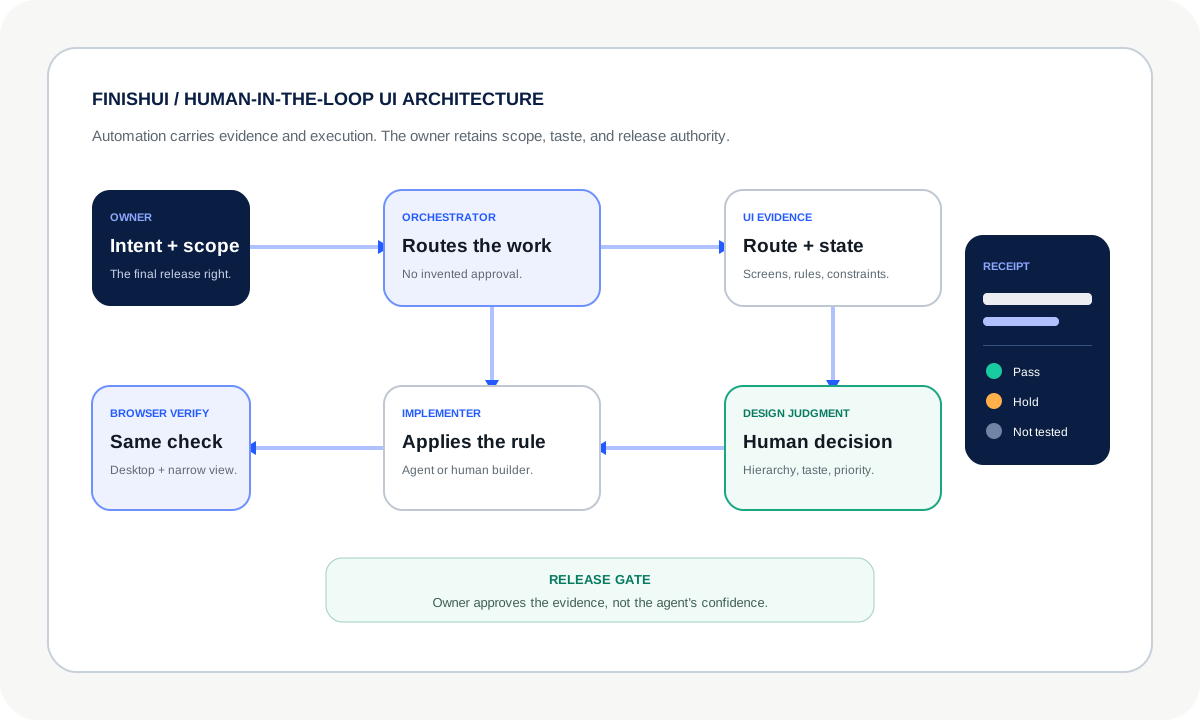
Save the diagrams, share them with your team, or use them to stop a coding agent from treating a confident output as a finished interface.
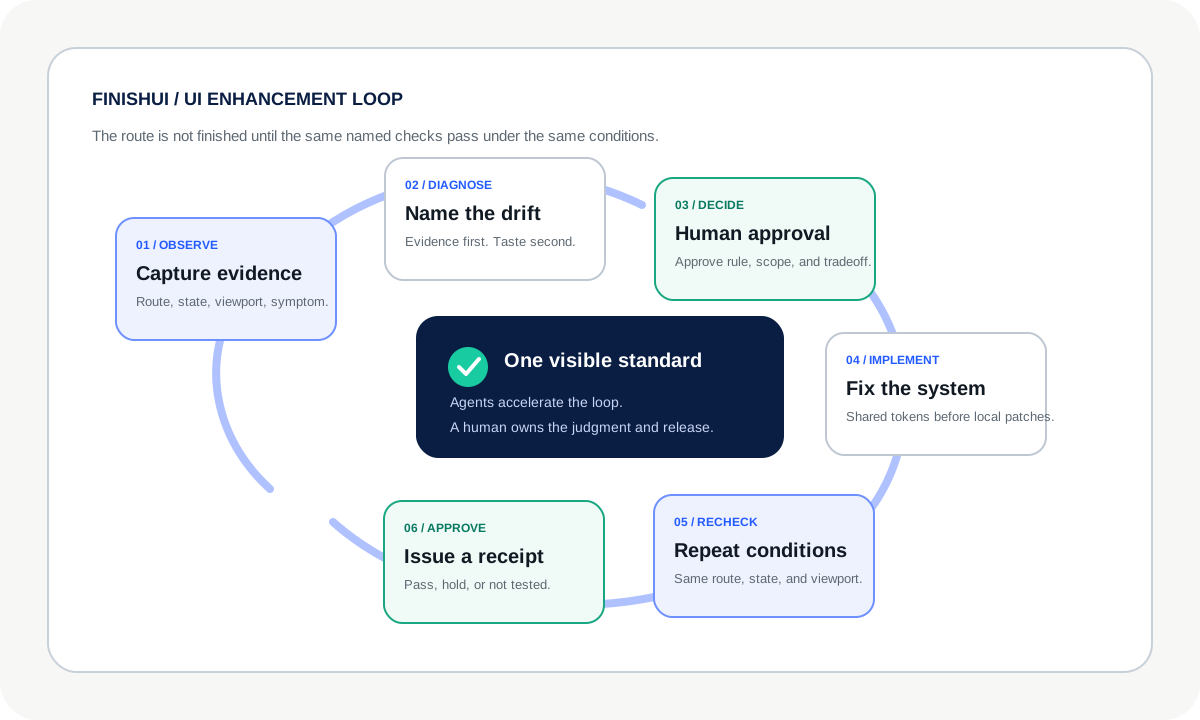
Map 01UI Enhancement Loop
Observe, diagnose, decide, implement, recheck, and approve.
FinishUI original diagrams. They describe one practical operating pattern, not a required standard or proof of product quality.
V1 / deliberately small
Tools, Prompts, Skills, Agents, and Repos
Each lane starts with one useful resource. More entries earn a place only after readers click, use, request, or convert.
01Tools
Official source · Direct unpaid link · Last reviewed July 15, 2026
Replit Agent
Best for turning a scoped product idea into a working browser-based prototype without setting up a local development environment first.
Why it earned inclusion
It combines prompting, code access, preview, and deployment in one place, which lowers setup friction for nontraditional technical founders.
Important limitation
Fast generation does not guarantee a coherent design system, correct product logic, accessibility, or production readiness. Credit use also rewards tighter scopes.
Compatibility note: review the source before installation. Availability, commands, and agent support can change, and a skill cannot replace project context or human approval.
04Agents
Official documentation · Direct unpaid link · Last reviewed July 15, 2026
OpenAI Agents SDK
Best for building an application that needs agents, tools, guardrails, handoffs, sessions, and tracing without inventing the orchestration layer from scratch.
Why it earned inclusion
The SDK exposes a small set of agent primitives and includes human-in-the-loop and tracing mechanisms.
Important limitation
An agent framework does not decide your product boundaries, security model, approval rights, or whether an agent should take an action.
Affiliate relationships never decide what earns a place.
Every link is labeled as direct unpaid, owned by FinishUI, referral, affiliate, or partner. At launch, every external V1 recommendation uses a direct unpaid link. If FinishUI later receives compensation, the label will change beside the link before the tracked link appears.
Video learning paths
FinishUI Watch Desk
Founder Watchlist
Six direct learning destinations grouped by the decision they help you make. This is a practical study path, not a popularity ranking or proof that every video is current.
Official course · Direct unpaid link · Last reviewed July 16, 2026
01 / UI foundations
Figma Design for beginners
Build a responsive portfolio site while learning frames, auto layout, components, and prototyping. Best starting point for understanding the design decisions AI builders often flatten.
Expert education channel · Direct unpaid link · Last reviewed July 16, 2026
02 / Visual judgment
Nielsen Norman Group
Use its research-led UX explainers to sharpen the reasoning behind hierarchy, interaction, navigation, and usability decisions instead of copying surface style.
Official product channel · Direct unpaid link · Last reviewed July 16, 2026
03 / Design systems
Figma
Follow official tutorials and product lessons on components, variables, auto layout, and shared libraries. Confirm current feature behavior in Figma's documentation.
Official company channel · Direct unpaid link · Last reviewed July 16, 2026
04 / Agentic coding
Anthropic
Use official Claude and Claude Code demonstrations to understand capabilities and workflows, then verify commands and limits against current product documentation.
Prefer a structured course? Start with Replit Learn.
Independent creator channel · Direct unpaid link · Last reviewed July 16, 2026
06 / Responsive craft
Flux Academy
Use selected web design and portfolio lessons to study composition, client presentation, and responsive craft. Treat creator opinions as guidance, not standards.
Your app can already work while the UI still feels inconsistent. Send one authorized public route. FinishUI will identify the visible holds and tell you whether the free route is enough or an applied cleanup fits.
Sometimes the UI problem is really an operating problem.
A screen can expose a larger system: disconnected AI tools, unowned workflows, and growth decisions no one can audit. For one qualifying company at a time, the Private Office works at that layer.
No public calendar · No generic discovery calls
01Earned accessPrior FinishUI work or a trusted executive introduction.
02Sponsored mandateA named decision-maker and a cross-functional AI or growth problem.
03Serious intentA real decision window and an approved five-figure budget.
The full qualification brief stays private. Only applications that clear it receive a conversation.